VIDEO PLAYBACK FOR macOS
Frame-accurate video playback
for Mac.
To SDI on AJA and Blackmagic hardware — or straight to any external display, no capture card required. A fast, dependable clip player for live events and broadcast, with robust redundancy, real timecode, synchronized countdown, and a simple single-window interface built for operators.
Free beta · Notarized .dmg · Apple Silicon · macOS 15.6+

01 · PLAYOUT & OUTPUTS
SDI when you have it.
Any display when you don’t.
Three output targets, one app: an AJA SDI device, a Blackmagic SDI device, or any external display connected to the Mac. Genlock-aware on SDI, refresh-matched on displays; either way, it hits the frame.
- External display output needs nothing extra — resolution follows macOS Display Settings, picture centered and aspect-preserved
- Supports all major broadcast SMPTE formats, from 720p to 8K DCI
- Follow Source — the device re-locks to each clip’s native format on load, so playout is a frame-exact match to the media
- Fixed Format — or pin one output format and TRUCUE will scale the raster and interpolate frames accordingly
- Alpha clips on keyer-equipped DeckLinks go out as separate Fill + Key SDI — automatic per clip, transparent-black idle between them
- Seamless clip-to-clip transitions — gapless from first item to last

NEW 02 · PRIMARY / BACKUP
Two machines. One show.
Pair two Macs on the same network and the second becomes a true, hot backup — same playlist, same media, same transport state, ready for the switcher to cut to at any moment. Backup is a complete, independent playout engine that follows your Primary — and keeps playing on its own output if anything ever happens to the main machine.

pair in one click over Bonjour or by IP · playlist syncs instantly · frame-locked to genlock on SDI, timed-fired within a frame on displays · media pushed to a path on the backup Mac · the Backup runs as the second Mac of your license
Pair in one click
Settings → Backup finds every other TRUCUE on the network via Bonjour or IP address. One click pairs them and you can distribute the media straight from there.
Always-identical playlist
Every edit — add, reorder, rename, trim, modes, bookmarks — lands on the Backup instantly. Files for new content are pushed automatically to a specified path on a remote Mac.
Frame-locked transport
Both machines fire at the same deadline over a dedicated clock-sync channel. Genlock frame-locks the SDI to make it identical; a watchdog reconciles any drift within seconds.
You stay in charge
TRUCUE never auto-promotes. Take Local Control unlocks the Backup as a standalone with the full show — output never interrupted. Link drops? It just keeps playing.
03 · PLAYLIST
Your rundown, in order.
Decide how every clip ends before the show starts: loop it, advance to the next, or send the block back to its own top — and playback flows through folders as if they weren’t there.
- Per-clip modes: Loop, Auto advance, and Jump-to-First for looping blocks that recycle
- Cue-in-black — arm a clip on black; nothing shows on air until you hit play
- Trim IN / OUT points and named bookmarks, with a countdown to the next mark
- Mixed frame rates and rasters in one list — HD to 4K DCI, stills included

04 · COUNTDOWN
One countdown. Four places at once.
Time remaining — on the operator’s Mac, on any spare display, out a DeckLink SDI connector, and on a web page anyone backstage can open. One engine, everything in sync to the second, styled once for all of them — and streamed over OSC for TouchOSC, Resolume, QLab, etc.
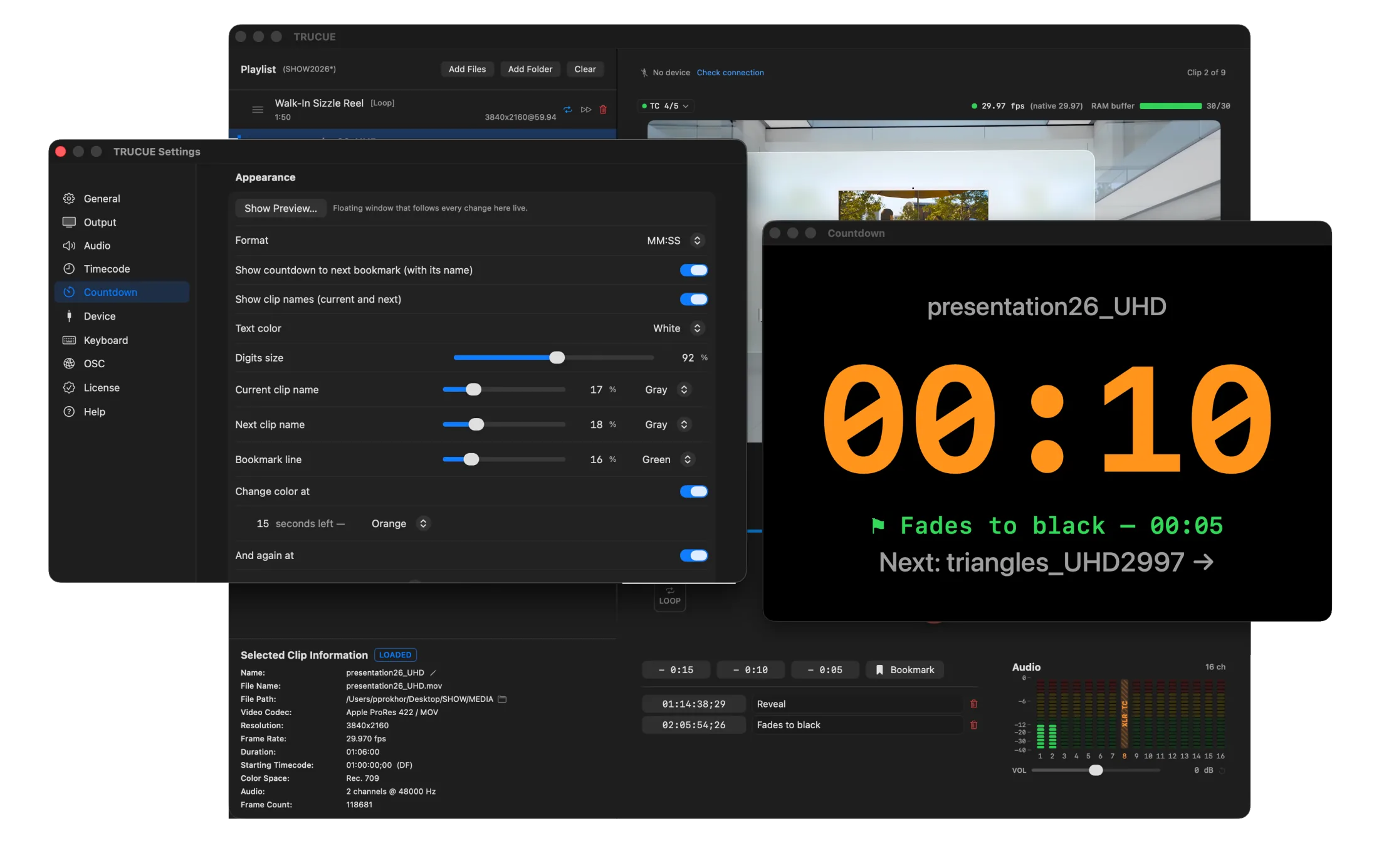
white → orange at 0:15 → red at 0:05, in two clicks · time remaining, clip names & “⚑ CEO walks — 00:45” bookmark line, each optional · live preview with a scrubber · OSC time-remaining stream, per-frame or 10–120 Hz
Floating window
Always on top on the operator’s Mac — even over full-screen apps. Drag it, resize it, it remembers its spot.
Full-screen display
Take over any connected monitor with huge digits on black — stage confidence, green room.
DeckLink SDI feed
A continuous 1080p countdown out a spare connector on a Blackmagic card, independent of program — patch it anywhere SDI goes.
Web page
Served over the interface of your choice — open it in any browser, no app, no internet needed. Survives sleep and Wi-Fi roaming.
— TRANSPORT & REVIEW
Every control has a key.
Standard transport plus J/K/L shuttle, frame stepping, and a two-stage previous button.
Review Mode adds relative jog buttons for re-watching a moment without scrubbing.
Quick-jump presets take you to “time remaining” positions for rehearsing clip endings.
05 · AUDIO
Sixteen lanes, patched your way.
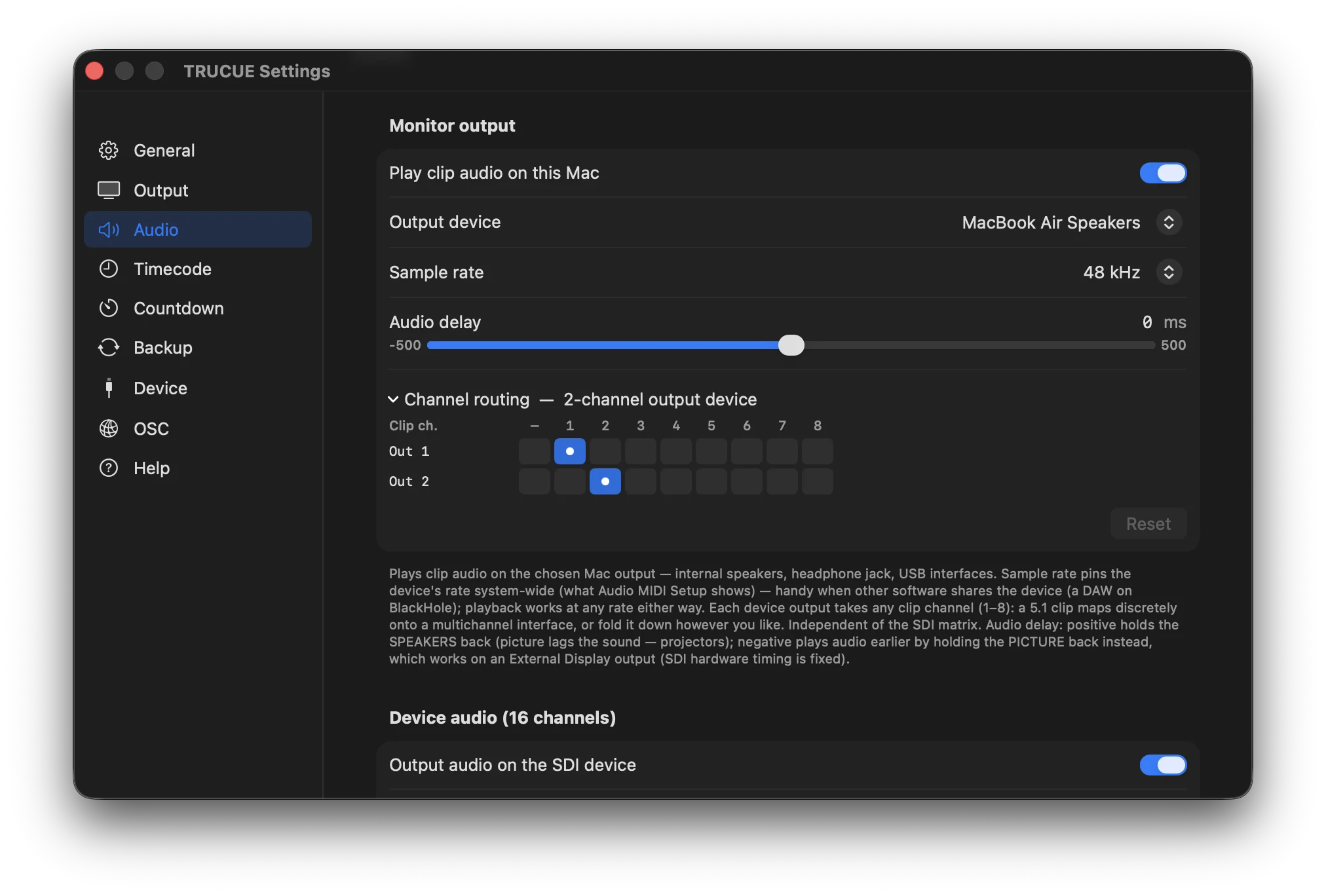
A proper patch grid for SDI, an independent multichannel matrix for the monitor device, per-clip gain under the meters — and timecode lanes that protect themselves.
- Per-clip volume — −20 to +20 dB in 0.5 dB steps, live while dragging, saved with the project; meters show the post-gain level
- Lip-sync — ±500 ms in 5 ms steps: positive holds the speakers back, negative holds the picture back
- 16-lane SDI patch matrix — any clip channel per lane, one click; XLR mirrors lanes 1–8 on AJA breakout
- Multichannel monitor output with its own matrix sized to the device — a 5.1 clip lands discretely on an interface while SDI carries the fold-down
- Click-to-mute metering and one-key Mute All — LTC lanes are badged and exempt, so muting never kills timecode
06 · TRANSCODE
Fix problem media without leaving the app.
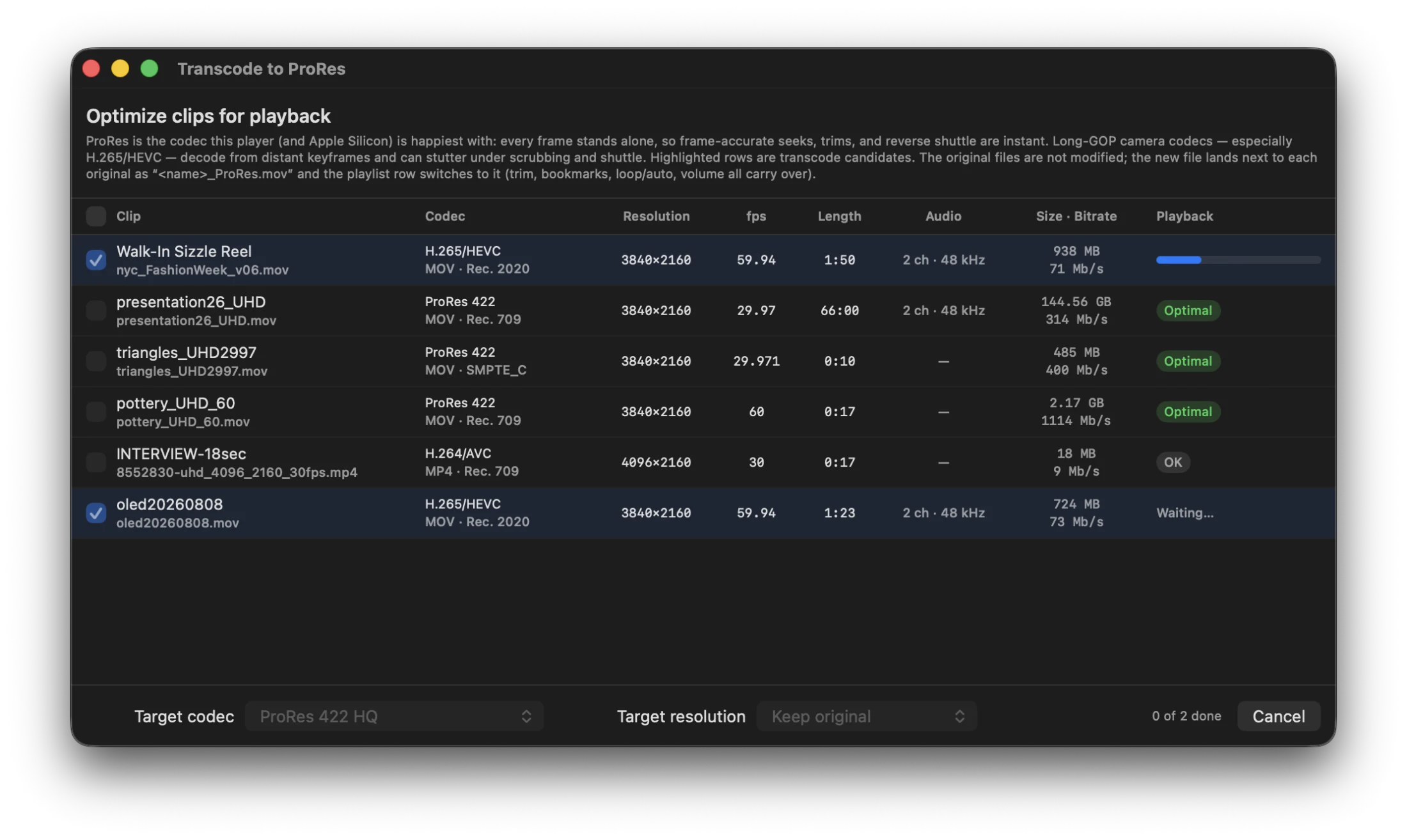
Long-GOP camera codecs — especially H.265/HEVC — decode from distant keyframes and can stutter under frame-accurate scrubbing. TRUCUE converts the media instead of fighting it: a batch ProRes transcoder built on Apple’s native engine, one menu away.
- Every clip health-rated — Optimal / OK / May struggle — with the strugglers pre-selected; nothing converts until you click
- ProRes Proxy → 4444 (alpha preserved); keep resolution or scale to 1080p / 720p
- In-place swap: the playlist row switches to the new file — trim, bookmarks, modes, gain all carry over; even the on-air clip reloads seamlessly
- Originals never touched — the new file lands beside them as
_ProRes.movand the playlist path is replaced automatically; embedded timecode passes through
07 · THE FULL TOOLKIT
Everything else it does.
Frame-accurate output is table stakes. These are the details that carry an operator through a live show.
Timecode, downstream
SMPTE ATC (RP-188) embedded in the SDI, LTC as audio on SDI channels and analog XLR / BNC breakout, with adjustable levels. Embedded or relative display — or type in your own.
OSC remote control
Full control over UDP — every key, plus load-by-name or index and jump-to-time. Addresses read /trucue/play or clear the prefix and go flat: /play. Plus a ready-made Bitfocus Companion module for Stream Deck control.
System Stats NEW
A live CPU / GPU / memory / thermal / drives window in the new Tools menu — so you can see the machine’s headroom before the show, sampling only while it’s open.
Instant Offline detection
A deleted or unplugged file flags its row within a couple of seconds — on the Primary, on the Backup, busy or idle — so a missing clip is never a surprise mid-show.
Named bookmarks
Drop named marks anywhere in a clip and jump straight to them — with a live countdown to the next mark, markers on the scrub bar, and a “⚑ CEO walks — 00:45” line you can put on the countdown.
Operator conveniences
The small stuff that adds up: silent in-app updates, an adjustable RAM buffer, quick-jump presets in M:SS “time remaining”, a custom idle image, and a choice of what opens on launch.
— COMPATIBILITY
The display you already have.
The SDI you already own.
AJA
Full SDI playout, plus analog XLR / BNC breakout for audio and LTC.
Blackmagic Design
DeckLink, UltraStudio, and Io — per-connector output selection, Fill + Key on keyer-equipped cards.
External Display
Any monitor, projector, or LED processor on the Mac — no capture hardware required.
All major broadcast SMPTE standards · outputs auto-detected — pick yours in Settings.
SYSTEM REQUIREMENTS
- macOS 15.6 or later
- Apple Silicon Mac
- For SDI output: an AJA or Blackmagic Design SDI device
- For Key & Fill: a DeckLink with a hardware keyer — Duo 2, Quad 2, 8K Pro, 4K Extreme
- For external-display output: just a connected monitor or projector — no capture hardware needed. The app also runs with no output at all, for setup and preview
— FREE WHILE IN BETA
Free while it’s in beta.
- Download it and go — no card, no trial timer
- On first launch the app asks for your name and email and sets up your license right there
- One license covers two Macs — enter the same name and email on the second (handy for a Primary + Backup pair)
- Activate online once — then runs offline, up to 4 weeks between silent check-ins
— FAQ
Questions, answered.
Why isn’t TRUCUE in the Mac App Store?
TRUCUE is distributed directly as a notarized .dmg — signed and checked by Apple’s notary service, so macOS opens it without security warnings. Direct delivery keeps licensing self-service, including offline activation and moving between machines.
Does it need internet?
Only to activate, and roughly once a month to check in — day-to-day it runs completely offline. A machine can go up to 4 weeks between check-ins; while it’s online, renewal happens silently in the background. Built for isolated broadcast rigs.
How do I move my license to another Mac?
Deactivate in the app (Settings → License → Deactivate) to free that seat, then activate on the new Mac with the same key. Self-service, right in the app — no email back-and-forth.
Can I run TRUCUE on more than one Mac?
Yes — one beta license covers up to two Macs at once. On the second Mac, open TRUCUE and enter the same name and email you joined with (or paste your key in Settings → License). That’s exactly what a Primary + Backup redundancy pair uses.
Does the Primary / Backup redundancy need a special license?
No special tier. Your beta license already covers two Macs, so a redundant Primary + Backup pair runs on one license — just enter the same name and email on the second machine. Both machines run the current build; SDI frame-lock needs house reference on both devices, while external-display outputs stay in sync over TRUCUE’s internal clock.
Do I need an AJA or Blackmagic card?
No. TRUCUE plays out full-screen to any external display connected to the Mac — a monitor, projector, or LED processor input — with no capture hardware at all. For SDI output you'll want an AJA or Blackmagic Design device (DeckLink, UltraStudio, Io); TRUCUE auto-detects whatever is connected, and you pick the output in Settings. Start with a display, add SDI later — same app, same license.
How does the beta license work?
TRUCUE is free while it’s in beta. Download it and open the app — it asks for your name and email on first launch and sets up your license right there, no card and no trial timer. One license runs on up to two Macs; on a second Mac, enter the same name and email. Activate online once, then it runs offline for up to 4 weeks between silent check-ins.
My H.265/HEVC files stutter when I scrub — what do I do?
Long-GOP camera codecs decode from distant keyframes, which fights frame-accurate scrubbing and shuttle. Open Modes → Transcode…: every clip is health-rated, the strugglers arrive pre-selected, and one click batch-converts them to ProRes. Playlist rows swap in place — trims, bookmarks, and modes intact — and the originals are never touched.
How do updates work?
TRUCUE checks for updates silently at every launch. When one exists you get a prompt; downloads are small (delta-sized), cryptographically signed, and notarized. Offline rigs are never interrupted — no connection, no dialog. A manual “Check for Updates…” lives in the app menu.
What happens when the beta ends?
When the beta wraps up, the app shows a notice and points you back here for the release version — nothing to cancel, it’s free while in beta. Questions in the meantime? Just write to support@trucue.io.
Try TRUCUE for free.
Fully functional. No account, no card — download, plug in your device, play.
macOS 15.6+ · Apple Silicon · Notarized by Apple · Direct download
Running a Stream Deck? Get the TRUCUE Companion module on GitHub.